Security
The bots' own network
Not done yet. Today the bots join the same Wi-Fi as everything else. This page is the plan, and the steps.
Why
- A bot’s Wi-Fi password is in its flash, which isn’t encrypted, so anyone holding a bot can read it out over USB. On a shared network, that’s the password to everything on it.
- A bot has more than one way in. It takes updates over the air, behind its own password. On a shared network, anything there can try passwords against it.
On a network of their own, with a Wi-Fi password per bot, a bot’s password opens only the bots’ network, and only for that bot: a lost one is taken off by removing its password, and no other bot changes. The bots’ network can reach only the broker, and only the machine that updates them can reach the bots.
What it should allow
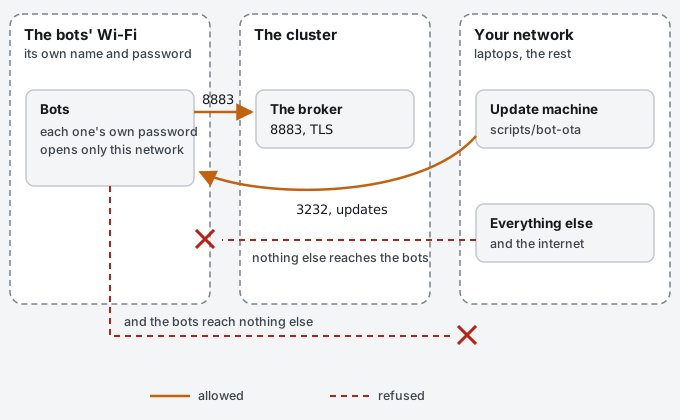
| From | To | Why |
|---|---|---|
| Bots | The broker, TCP 8883 | MQTT over TLS: everything a bot says and hears |
| Bots | The router: DHCP, DNS | To join, and to get an address |
| The machine you flash and update from | Bots, TCP 3232 | Updates over the air (scripts/bot-ota upload), when you do them |
| Everything else | Bots | Nothing |
| Bots | Everything else, the internet among it | Nothing |
The broker needs to let the bots’ network in. A broker of your own that keeps to a list of networks (a firewall, or a Kubernetes NetworkPolicy) needs the bots’ range on it. In bench mode, the machine running the broker has to be reachable from the bots’ network on 8883.
Setting it up
The details depend on your router. The steps are the same everywhere:
- A Wi-Fi network for the bots alone, on a VLAN of its own, with a password per device rather than one for all (UniFi calls them private pre-shared keys; added in UniFi Network 7.5, WPA2 only). WPA2, and 2.4 GHz, because the ESP32 doesn’t do 5 GHz.
- Firewall rules as in the table: allow bots to the broker on 8883, and your update machine to the bots on 3232. Deny the rest, both ways.
- The broker lets it in. Add the new range to the networks your broker accepts, or for bench mode, let it reach the machine running the broker on 8883.
- Each bot moves over. Put the new network’s name in
firmware/include/bot_config.h(WIFI_SSID) and reflash, then give the bot its own password:scripts/bot-wifi new bot-xxxxxxmakes it and keeps it in Vault, you add it to the network as that bot’s key, and typewifi-passwordand the password into the bot over USB (Logins and certificates). Its certificate and update password stay: they’re in the bot’s flash, not in the firmware. - Check it. From the bots’ network, the broker answers on 8883 and nothing else on your network answers at all.
From your machine,
scripts/bot-ota uploadstill reaches a bot.
What’s left after
- A bot’s Wi-Fi password can still be read out of its flash, by whoever holds the bot, until flash encryption (desk-issues#4). It opens the bots’ network only, as that bot, until its key is removed.
- Nothing limits wrong update passwords, and an unsigned image is checked only after it’s written (desk-issues#6). Limiting who can reach port 3232 is the fix you can make today.