Tutorial 03 · 30 min
The simulator and the viewer
Start simulated bots, watch them on a desk in your browser, drive them, stop them with the e-stop, and crash them to see their last wills. Everything the station will do later, you do by hand first.
Do 02. Protocol v0 by hand first. Use two terminal windows and a browser.
What’s running
Three containers, all on your machine:
  simulator (scripts/sim)                broker (scripts/broker)               viewer (scripts/viewer)
  sim-1, sim-2, ...  ── MQTT 1883 ──►   Mosquitto   ◄── WebSockets 9001 ──   your browser
  and the position service                 ▲                                  (a page served on 8080)
                                           │ MQTT 1883
                                        you: scripts/broker send / stream
- The simulator is one program pretending to be several bots. Each bot has its own MQTT connection and last
will, as a real one would. It also pretends to be the overhead camera, publishing each bot’s
pose. - The viewer is a web page. It connects to the broker straight from your browser, over WebSockets. In this tutorial it only watches. It has a drive panel too, which needs the station. That’s tutorial 06.
- You are the station for now. Commands come from your terminal.
1. Start everything
Terminal A:
scripts/broker up
scripts/sim up 2
scripts/viewer up
broker: up on 127.0.0.1:1883, WebSockets on 127.0.0.1:9001 (container, docker.io/library/eclipse-mosquitto:2.1.2-alpine)
sim: 2 bot(s) up, sim-1 to sim-2, fleet desk unless --fleet says otherwise. scripts/sim logs to follow them.
viewer: up. Open http://127.0.0.1:8080/
The first scripts/sim up builds the simulator’s image, which takes a minute or two. After that it starts in
seconds.
Open http://127.0.0.1:8080/ in your browser. To open it from the terminal: open http://127.0.0.1:8080/ on macOS, xdg-open on Linux, wslview on Windows
(in WSL, from the wslu package).
You should see:
- “connected” in green at the top.
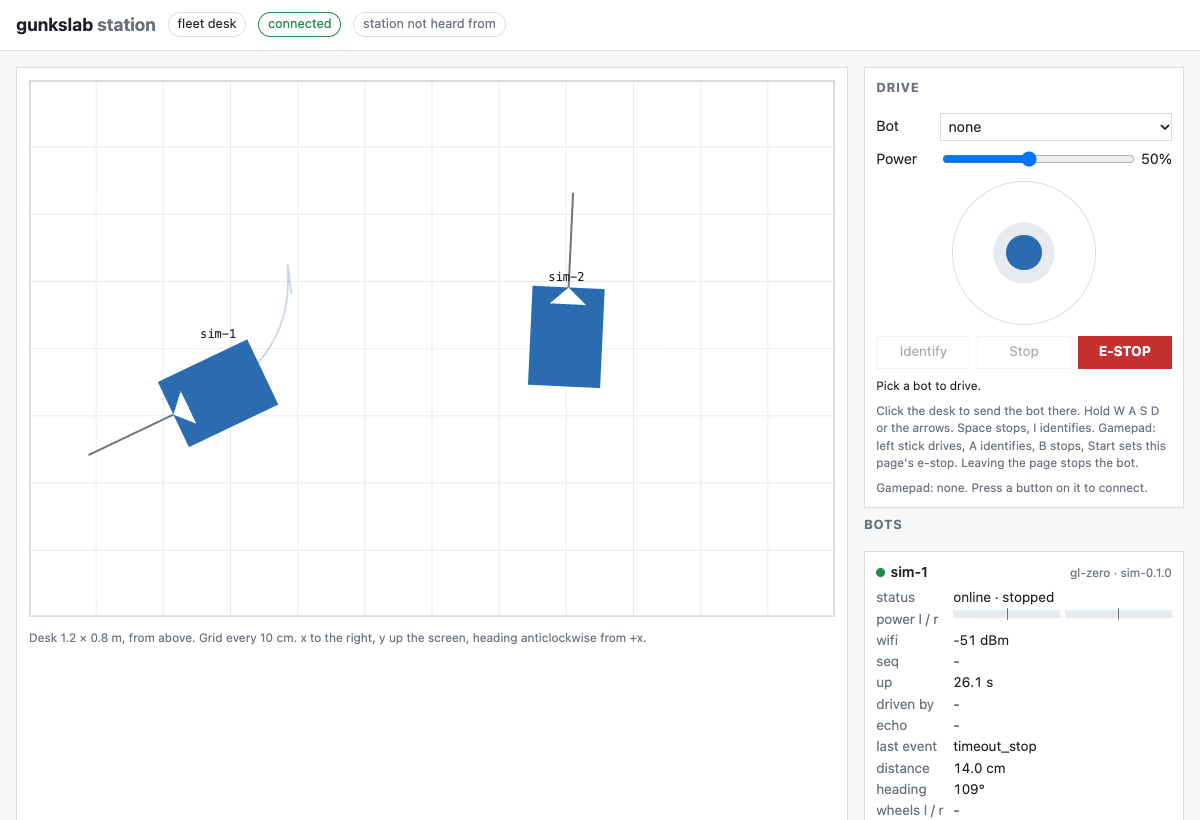
- The desk, 1.2 × 0.8 m from above, with a 10 cm grid, and two bots side by side. The white notch is each bot’s front.
- A card for each bot on the right: online, stopped, its Wi-Fi, how long it’s been up, and what it has (an IMU and a distance sensor).
The event log is empty. The bots announced their boot before you opened the page, and events aren’t retained (see
tutorial 02, step 7). The cards still filled in, because hello and status are retained.
2. Watch the events
The bots send telemetry and the position service sends a pose ten times a second each, which floods
scripts/broker watch. Watch only events and statuses instead.
Terminal B:
scripts/broker sub -v -t 'gunkslab/v0/desk/+/event' -t 'gunkslab/v0/desk/+/status'
Leave it running.
3. Drive
The bots stop 500 ms after the last command (the dead-man rule), so one send barely moves them. stream sends the
same command every 100 ms for as long as you say.
Terminal A, drive sim-1 forward at 40% power for 2 seconds:
scripts/broker stream 2 gunkslab/v0/desk/sim-1/cmd '{"l":0.4,"r":0.4}'
In the browser, sim-1 drives up the desk and leaves a trail. Its card shows both power bars at 40%. Both terminals and
the event log show it stopping:
gunkslab/v0/desk/sim-1/event {"up_ms":7524,"kind":"timeout_stop"}
About half a second after the commands end, the bot stops itself (timeout_stop). It covered about 14 cm: 2 s × 0.4 ×
the simulated gl_zero’s top speed of 0.15 m/s is 12 cm, and it keeps going for that half second before it stops.
Now pivot it on the spot, with the left side backwards and the right forwards:
scripts/broker stream 2 gunkslab/v0/desk/sim-1/cmd '{"l":-0.4,"r":0.4}'
It turns anticlockwise, about half a turn, so it faces back down the desk. Then curve, with more power on the left:
scripts/broker stream 2 gunkslab/v0/desk/sim-1/cmd '{"l":0.8,"r":0.5}'
It arcs to the right. Skid steer is only ever these two numbers: equal goes straight, opposite turns on the spot, anything else curves.
A bot facing the edge of the desk won’t drive forward until it’s turned away (step 6). If you drive one there
yourself, pivot it back, or scripts/sim down then scripts/sim up 2 puts both back in the middle.
Now a single command, without streaming:
scripts/broker send gunkslab/v0/desk/sim-1/cmd '{"l":0.6,"r":0.6}'
It twitches forward a few centimetres (about 4.5 when this was written) and stops, with another timeout_stop.
That’s the dead-man rule. The station went quiet, so the bot stopped.
4. Find a bot
scripts/broker send gunkslab/v0/desk/sim-2/cmd '{"identify":true}'
You’ll see sim-2 wiggle left and right for a second and stop where it was. On a real desk with four identical bots, this is
how you find out which one is sim-2.
5. The e-stop
Set yours, Terminal A. You’re me. Everyone’s e-stop is on a topic of their own, and the fleet stops while any is
on:
scripts/broker pub -r -q 1 -t gunkslab/v0/desk/estop/me -m '{"stop":true}'
- The browser shows a red “E-STOP set by me” banner, and both cards say stopped.
- The event log shows
estop_onfrom each bot.
Try to drive sim-2. It hasn’t driven yet, so it has room ahead:
scripts/broker stream 2 gunkslab/v0/desk/sim-2/cmd '{"l":0.4,"r":0.4}'
Nothing moves. Every bot ignores commands during an e-stop. Clear it: an empty retained message (-n) takes yours
away.
scripts/broker pub -r -q 1 -t gunkslab/v0/desk/estop/me -n
The banner goes, and each bot sends estop_off. They’re still stopped until they get a fresh command. Drive again
to check:
scripts/broker stream 1 gunkslab/v0/desk/sim-2/cmd '{"l":0.4,"r":0.4}'
sim-2 moves up the desk a few centimetres and stops, with a timeout_stop.
6. The edge of the desk
Drive sim-2 on up the desk, for longer than there’s room:
scripts/broker stream 8 gunkslab/v0/desk/sim-2/cmd '{"l":1,"r":1}'
Its front stops about 10 cm short of the edge, and the log says edge_stop, though the commands still say full power.
The power bars drop to nothing, and its card says distance nothing · EDGE. Its distance sensor, on the front and aimed
partly down, has seen the desk end ahead, and it won’t drive forward any further. The bot decides that itself. 10. The
distance sensor covers it.
Backwards, it has no sensor. The simulated desk has walls, so a bot backed into the edge stays pressed against it. A real desk doesn’t. Boxes and other bots stop it the same way: it presses against them and pushes nothing.
7. A flat battery and a stalled motor
A real bot that watches its own motors and battery stops itself and says why (rule 10). A simulated one has neither,
so you tell it what’s gone wrong. Drive sim-1 backwards in Terminal A:
scripts/broker stream 4 gunkslab/v0/desk/sim-1/cmd '{"l":-0.5,"r":-0.5}'
While it’s moving (you have 4 seconds), stall its left motor from a third terminal. Leave Terminal B watching:
scripts/sim fault sim-1 stall L
Its left power bar drops to nothing while the right keeps going, so it curves, and the log says stall_stop (L). The
motor stays off until its side is asked for nothing, or for the other way: the next drive works again.
Then the battery. scripts/sim fault sim-1 battery low is a warning. The bot sends battery_low, its card’s battery
says LOW, and it still drives. scripts/sim fault sim-1 battery empty stops it. It sends battery_empty, the card
says EMPTY and the motors go off. Drive it now and nothing moves, whatever the commands say.
scripts/sim fault sim-1 battery ok is a charged battery again.
8. Crash the simulator
scripts/sim crash
sim: crashed
The simulator was killed outright, with no goodbye. Terminal B shows the broker publishing each bot’s last will:
gunkslab/v0/desk/sim-2/status {"state":"offline"}
gunkslab/v0/desk/sim-1/status {"state":"offline"}
In the browser, both bots fade where they stood and their cards go grey. The viewer keeps the last place each bot was seen, faded once nothing new has come for a second.
Bring them back:
scripts/sim up 2
This time the viewer was open when they connected, so the event log shows each boot with its reason, power_on.
They start again in the middle of the desk: the simulator doesn’t remember where they were.
9. A bigger fleet on a bigger desk
scripts/sim down
scripts/sim up 4 --desk 1.5x1.0
sim: down
sim: 4 bot(s) up, sim-1 to sim-4, fleet desk unless --fleet says otherwise. scripts/sim logs to follow them.
Open the viewer with the same desk size: http://127.0.0.1:8080/?desk=1.5x1.0. You’ll see the bigger desk, and a
card for each of the four bots. The page’s settings go in its
address: desk, fleet (default desk), and ws (the broker’s WebSocket address).
Drive any of the four, as above. scripts/sim options lists everything up can take.
If you later start fewer bots, sim-3 and sim-4 still show as offline: their retained hello and offline status
stay on the broker. Restarting the broker clears them, because it keeps nothing between runs.
10. Tidy up
Stop Terminal B with Ctrl-C, then Terminal A:
scripts/viewer down
scripts/sim down
scripts/broker down
How it’s built: the codebase.
Check yourself
- Why did a single
sendonly twitch the bot? (3. Drive) - Which command turns a bot on the spot to the right? (3. Drive)
- After the e-stop is cleared, why doesn’t the bot carry on? (5. The e-stop)
- The viewer was opened after the bots started. Why are the cards filled in, but the event log empty? (1. Start everything)
- What did the broker do when the simulator crashed, and why didn’t the simulator have to do anything? (8. Crash the simulator)
Stuck?
- Run
./gunkslab doctor. It checks the container runtime and the ports, and printsFIXwith what to do. - Troubleshooting has the common problems and their fixes.
- Known issues says what’s untested or doesn’t work yet.
- Still stuck? Open an issue in desk-issues with what you typed,
what you saw, and the output of
./gunkslab doctor.