Tutorial 07 · 20 min
Send a bot somewhere
Until now a person has driven every move. Now the station drives. You say where, and it steers the bot there from the position the overhead camera reports. Here the simulator plays the camera.
Do 06. The driving page first. Have the protocol reference open at The station, the Go to a point rule.
1. Start everything
scripts/broker up
scripts/sim up 2
scripts/station up
scripts/viewer up
broker: up on 127.0.0.1:1883, WebSockets on 127.0.0.1:9001 (container, docker.io/library/eclipse-mosquitto:2.1.2-alpine)
sim: 2 bot(s) up, sim-1 to sim-2, fleet desk unless --fleet says otherwise. scripts/sim logs to follow them.
station: up. scripts/station logs to follow it.
viewer: up. Open http://127.0.0.1:8080/
Open http://127.0.0.1:8080/ and pick sim-1 in the Drive panel.
2. Click the desk
Click anywhere on the desk. Over the desk the pointer is a crosshair.
- A cross appears where you clicked, with a dashed line from
sim-1to it. - The status line says where it’s going:
Sending sim-1 to x 0.60, y 0.20 m. - The bot turns on the spot until it roughly faces the cross, then drives to it, slowing as it gets close.
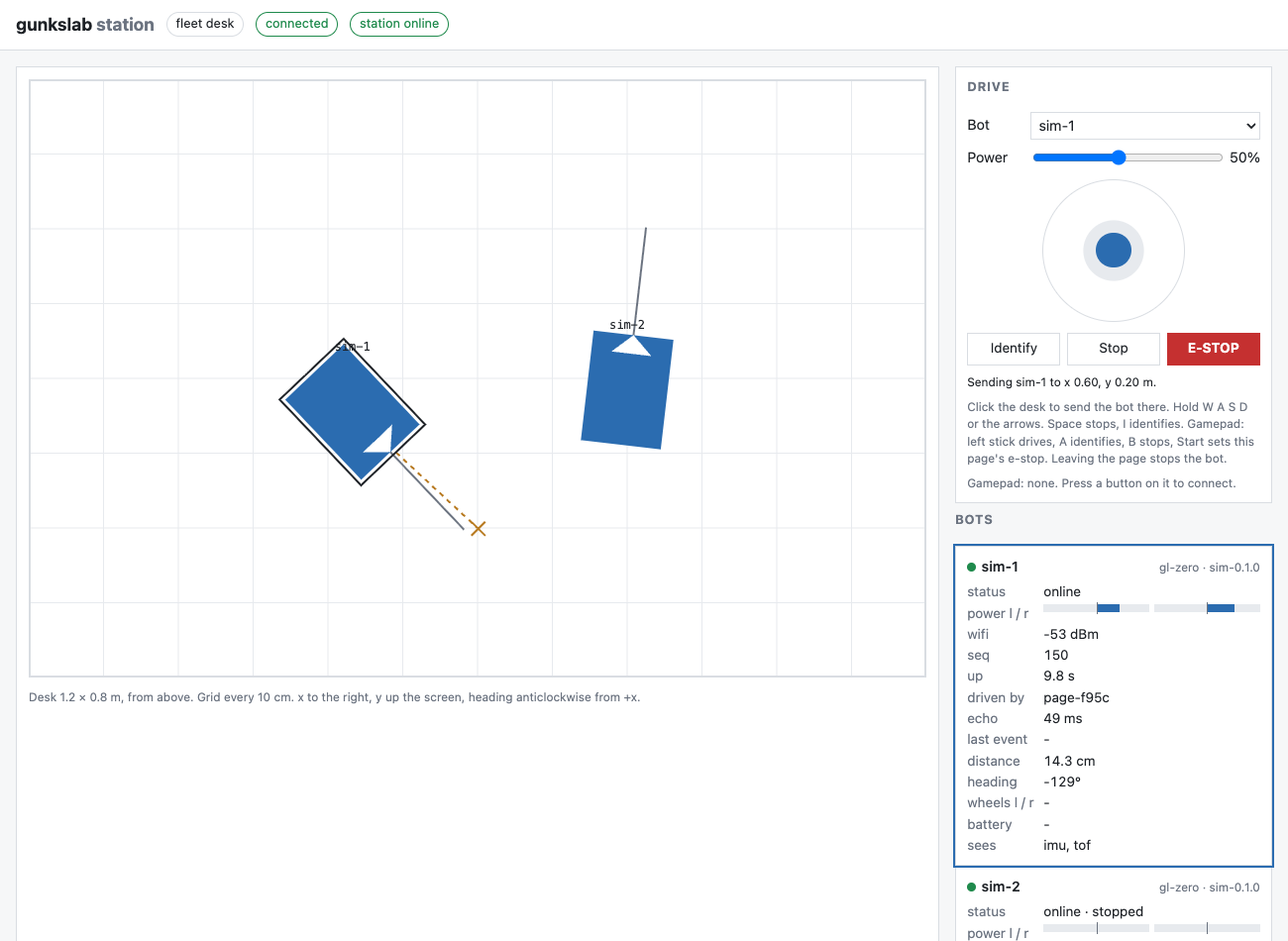
When it gets within 3 cm, it stops, the cross goes, and the status line says sim-1 arrived.
Click somewhere else, and then somewhere behind it. Watch how it turns first when the goal is off to the side or behind, and drives straight in when it’s ahead.
How it steers
The station does this ten times a second, from the bot’s latest position (station/gunkstation/core.py, steer):
- Far off heading (more than about 35°): turn on the spot, towards the goal.
- Roughly facing it: drive forward, with power proportional to the distance left (between 20% and 60%), and steer by how far off the heading is.
- Within 3 cm: stop, and tell the client
arrived.
There’s no path planning. It heads straight for the goal. Keeping out of other bots’ way is 09, and the bot’s own sensor stopping it short is 10.
3. Take over
Click a far corner, and while sim-1 is on its way, press S. The trip is cancelled the moment you drive by
hand. The cross goes, and the bot does what your keys say. The same happens with Stop, with switching the
Bot list, or with the e-stop.
4. Nobody else can interrupt
Send sim-1 somewhere far, and while it travels, try to take it from Terminal A, as a different client:
scripts/broker send gunkslab/v0/desk/station/drive/other '{"bot":"sim-1","l":-1,"r":-1}'
It’s refused, held, exactly as in tutorial 05. The station’s log says so (scripts/station logs):
21:18:52 station refused sim-1 for other: held
While the station is driving a bot for you, you hold it.
5. Go there without the page
A go-to is one message. It doesn’t need streaming like hand driving. Send sim-2 somewhere from Terminal A:
scripts/broker send gunkslab/v0/desk/station/drive/me '{"bot":"sim-2","goto":{"x":0.3,"y":0.6}}'
Watch it go in the browser. A few seconds later the station’s log has it:
scripts/station logs
21:19:10 station goto sim-2 for me: arrived
And where it stopped:
scripts/broker sub -t gunkslab/v0/desk/sim-2/pose -C 1
{"t_ms":1790975954290,"x":0.3209,"y":0.5917,"theta":2.7674,"source":"sim"}
About 2 cm from the point asked for. The bot coasts a little after the stop, which is why the station stops at 3 cm rather than waiting for zero.
6. When it can’t get there
The station ends a go-to and tells the client why:
| Notice | Means |
|---|---|
arrived |
It got within 3 cm and stopped. |
no_pose |
Refused at the start: no position for the bot in the last half second, so nothing to steer from. |
edge |
Refused at the start: the point is too near the desk’s edge for the bot to end at. Only when the station knows the desk’s size (--desk, tutorial 09). See 10. |
lost |
The positions stopped coming for 2 seconds on the way. It stopped the bot. |
timeout |
Not there after 30 seconds. It stopped the bot. |
blocked |
The bot’s own distance sensor held it back for 3 seconds: something it can’t drive into, or the desk’s edge. Or the point is inside something its sensor found, or there’s no way round it, even after the bot has looked round. See 10. |
estop |
The e-stop came on during the trip. |
offline |
The bot went offline during the trip (its last will arrived). |
battery_empty |
The bot’s battery went empty during the trip, or was already. The station won’t drive it until it’s charged. |
Try blocked: click a point right by the desk’s edge, in front of the bot. Its distance sensor sees the desk end
about 21 cm ahead of its middle, and won’t let it drive any further forward. Its middle can’t get much closer than
about 20 cm to an edge it’s facing. After 3 seconds of that, the station gives up. Told the desk’s size, the station
does better: it brings the bot in at a slant, or refuses a point it can’t reach (10).
./gunkslab up tells it; this tutorial’s scripts/station up doesn’t.
Try offline: send a bot somewhere far, and while it travels, crash the simulator with scripts/sim crash. The
bots’ last wills reach the station at once, so the trip ends offline, before the 2 seconds that lost waits for.
lost is for a bot that stays online while the camera loses sight of it, which the simulator can’t show. It plays
both the bots and the camera. Start the simulator again afterwards with scripts/sim up 2.
7. Tidy up
scripts/viewer down
scripts/station down
scripts/sim down
scripts/broker down
How it’s built: the codebase.
Check yourself
- The goal is directly behind the bot. What does it do first? (How it steers)
- Why does a go-to need only one message, when hand driving needs ten a second? (5. Go there without the page)
- A bot is on its way, and you press D. What happens to the trip? (3. Take over)
- Why does clicking right by the desk’s edge, in front of the bot, end in
blocked? (6. When it can’t get there)
Stuck?
- Run
./gunkslab doctor. It checks the container runtime and the ports, and printsFIXwith what to do. - Troubleshooting has the common problems and their fixes.
- Known issues says what’s untested or doesn’t work yet.
- Still stuck? Open an issue in desk-issues with what you typed,
what you saw, and the output of
./gunkslab doctor.